

 शिक्षक के रूप में पंजीकरण करें
Interface issues and solutions for the elderly population


स्टोरीबोर्ड पाठ
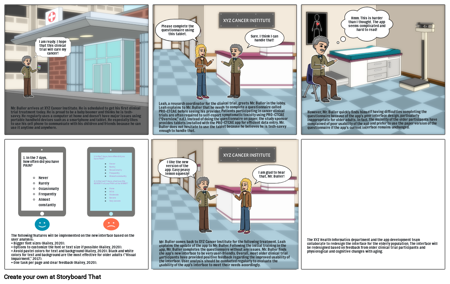
- Mr. Buller arrives at XYZ Cancer Institute. He is scheduled to get his first clinical trial treatment today. He is proud to be a baby boomer and thinks he is tech-savvy. He regularly uses a computer at home and doesn’t have major issues using portable handheld devices such as a smartphone and tablet. He especially likes to use his cell phone to communicate with his children and friends because he can use it anytime and anywhere.
- I am ready. I hope that this clinical trial will cure my cancer!
- Please complete the questionnaire using this tablet.
- Leah, a research coordinator for the clinical trial, greets Mr. Buller in the lobby. Leah explains to Mr. Buller that he needs to complete a questionnaire called PRO-CTCAE before seeing his provider. Patients participating in cancer clinical trials are often required to self-report symptomatic toxicity using PRO-CTCAE (“Overview,” n.d.). Instead of doing the questionnaire on paper, the study sponsor provides tablets installed with the PRO-CTCAE app for efficient data entry. Mr. Buller does not hesitate to use the tablet because he believes he is tech-savvy enough to handle that.
- XYZ CANCER INSTITUTE
- Sure. I think I can handle that!
- However, Mr. Buller quickly finds himself having difficulties completing the questionnaire because of the app’s poor interface design, particularly inappropriate for older adults. In fact, the majority of the older participants have complained of poor usability of the app and prefer to use the paper version of the questionnaire if the app’s current interface remains unchanged.
- Hmm. This is harder than I thought. The app seems complicated and hard to read!
- The following features will be implemented on the new interface based on the user analysis:• Bigger font sizes (Hailey, 2020).• Options to customize the font or text size if possible (Hailey, 2020).• Avoid pastel colors for text and background (Hailey, 2020). Black and white colors for text and background are the most effective for older adults (“Visual Impairment,” 2017).• One task per page and clear feedback (Hailey, 2020).
- 1. In the 7 days, how often did you have PAIN?NeverRarelyOccasionallyFrequentlyAlmost constantly
- 1. In the 7 days, how often did you have PAIN?NeverRarelyOccasionallyFrequentlyAlmost constantly2. In the last 7 days, what was the SEVERITY of your PAIN at its WORST?NoneMildModerateSevereVery severe
- I like the new version of the app. Easy peasy lemon squeezy!
- Mr. Buller comes back to XYZ Cancer Institute for the following treatment. Leah explains the update of the app to Mr. Buller. Following the initial training in the app, Mr. Buller completes the questionnaire without any issues. Mr. Buller finds the app’s new interface to be very user-friendly. Overall, most older clinical trial participants have provided positive feedback regarding the improved usability of the interface. User analysis should be conducted regularly to evaluate the usability of the app’s interface to meet their needs accordingly.
- XYZ CANCER INSTITUTE
- I am glad to hear that, Mr. Buller!
- The XYZ Health Informatics department and the app development team collaborate to redesign the interface for the elderly population. The interface will be redesigned based on feedback from older clinical trial participants and physiological and cognitive changes with aging.
40 मिलियन से अधिक स्टोरीबोर्ड बनाए गए
कोई डाउनलोड नहीं, कोई क्रेडिट कार्ड नहीं, और कोशिश करने के लिए किसी लॉगिन की आवश्यकता नहीं है!
