

Train ticket booking through IRCTC web


Texto do Storyboard
- IRCTC
- Email Id: ...........
- Mobile No: ...........
- Password: ...........
- Sign In
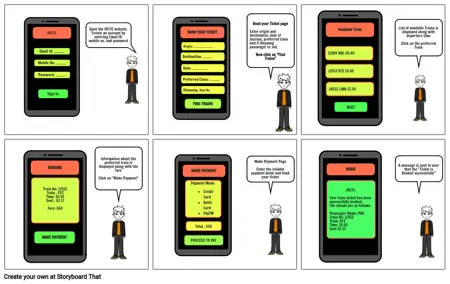
- Open the IRCTC website.Create an account by entering Email ID, mobile no. and password
- BOOK YOUR TICKET
- Destination: ...........
- Preferred Class: ............
- Date: ...................
- Divyaang: Yes/ No
- Origin: .......................
- FIND TRAINS
- Book your Ticket pageEnter origin and destination, date of journey, preferred class and if divyaang passenger or not.Now click on "Find Trains"
- 12189 ABC 05:45
- 12512 XYZ 15:30
- Available Train
- 18532 LMN 17:30
- NEXT
- List of available Trains is displayed along with departure timeClick on the preferred Train
- BOOKING
- Train No: 12512Train : XYZTime: 15:30Seat : S3 17Fare: 550
- MAKE PAYMENT
- Information about the preferred train is displayed along with the fareClick on "Make Payment"
- MAKE PAYMENT
- PROCEED TO PAY
- Payment Mode:Credit CardDebit CardPayTMGPay
- Total : 550
- Make Payment PageEnter the reliable payment mode and book your ticket
- IRCTC:Your train ticket has been successfully booked. The details are as follows:Passenger Name: PQRTrain No: 12512Train: XYZTime: 15:30Seat S3 17
- INBOX
- A message is sent to user that the "Ticket is Booked successfully"