

Ahmed Books Istiraha


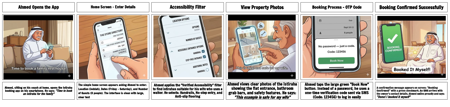
Storyboard Text
- Glida: 1
- Ahmed Opens the App
- Ahmed, sitting on his couch at home, opens the Istiraha booking app on his smartphone. He says: "Time to book an istiraha for the family"
- Glida: 2
- Home Screen - Enter Details
- The simple home screen appears asking Ahmed to enter: Location (Jeddah), Dates (Friday - Saturday), and Number of Guests (8 people). The interface is clean with large, clear text
- Glida: 3
- Accessibility Filter
- Ahmed applies the "Verified Accessibility" filter to find istirahas suitable for his wife who uses a walker. He selects: Handrails, No-step entry, and Anti-slip flooring
- Glida: 4
- View Property Photos
- Ahmed views clear photos of the istiraha showing the flat entrance, bathroom grab bars, and safety features. He says: "This example is safe for my wife"
- Glida: 5
- Booking Process - OTP Code
- Ahmed taps the large green "Book Now" button. Instead of a password, he uses a one-time verification code sent via SMS (Code: 123456) to log in easily
- Glida: 6
- Booking Confirmed Successfully
- A confirmation message appears on screen: "Booking Confirmed!" with a green checkmark. An SMS arrives with the owner's contact details. Ahmed smiles proudly and says: "Done! I booked it myself"