

eCounsel Counsellor


Süžeeskeem Tekst
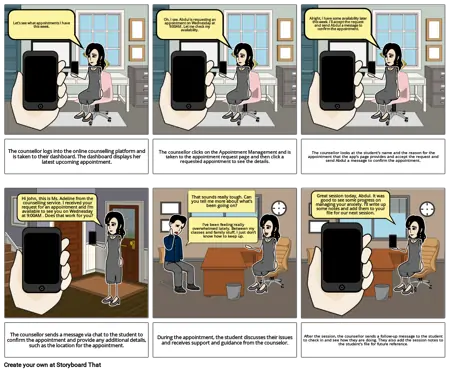
- Let's see what appointments I have this week.
- Oh, I see. Abdul is requesting an appointment on Wednesday at 9:00AM . Let me check my availability.
- Alright, I have some availability later this week. I'll accept the request and send Abdul a message to confirm the appointment.
- The counsellor logs into the online counselling platform and is taken to their dashboard. The dashboard displays her latest upcoming appointment.
- Hi John, this is Ms. Adeline from the counselling service. I received your request for an appointment and I'm available to see you on Wednesday at 9:00AM . Does that work for you?
- The counsellor clicks on the Appointment Management and is taken to the appointment request page and then click a requested appointment to see the details.
- That sounds really tough. Can you tell me more about what's been going on?
- I've been feeling really overwhelmed lately. Between my classes and family stuff, I just don't know how to keep up.
- The counsellor looks at the student's name and the reason for the appointment that the app's page provides and accept the request and send Abdul a message to confirm the appointment.
- Great session today, Abdul. It was good to see some progress on managing your anxiety. I'll write up some notes and add them to your file for our next session.
- The counsellor sends a message via chat to the student to confirm the appointment and provide any additional details, such as the location for the appointment.
- During the appointment, the student discusses their issues and receives support and guidance from the counselor.
- After the session, the counsellor sends a follow-up message to the student to check in and see how they are doing. They also add the session notes to the student's file for future reference.