

ITHIA


Süžeeskeem Tekst
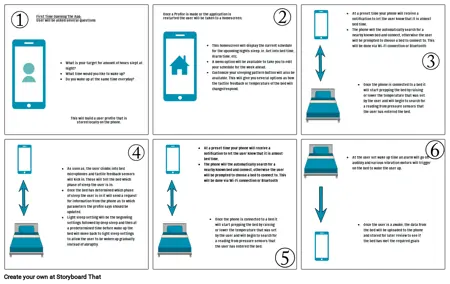
- First Time Opening The App:User will be asked several questions
- What is your target for amount of hours slept at night?What time would you like to wake up?Do you wake up at the same time everyday?
- This will build a user profile that is stored locally on the phone.
- Once a Profile is made or the application is restarted the user will be taken to a homescreen.
- This homescreen will display the current schedule for the upcoming nights sleep. ie. Get into bed time, Alarm time, etc.A menu option will be available to take you to edit your schedule for the week ahead. Customize your sleeping pattern button will also be available. This will give you several options as how the tactile feedback or temperature of the bed will change/respond.
- At a preset time your phone will receive a notification to let the user know that it is almost bed time.The phone will the automatically search for a nearby known bed and connect, otherwise the user will be prompted to choose a bed to connect to. This will be done via Wi-Fi connection or Bluetooth connection
- Once the phone is connected to a bed it will start prepping the bed by raising or lower the temperature that was set by the user and will begin to search for a reading from pressure sensors that the user has entered the bed.
- As soon as, the user climbs into bed microphones and tactile feedback sensors will kick in. These will tell the bed which phase of sleep the user is in. Once the bed has determined which phase of sleep the user is in it will send a request for information from the phone as to which parameters the profile says should be updated.Light sleep setting will be the beginning settings followed by deep sleep and then at a predetermined time before wake up the bed will move back to light sleep settings to allow the user to be woken up gradually instead of abruptly.
- At a preset time your phone will receive a notification to let the user know that it is almost bed time.The phone will the automatically search for a nearby known bed and connect, otherwise the user will be prompted to choose a bed to connect to. This will be done via Wi-Fi connection or Bluetooth connection
- Once the phone is connected to a bed it will start prepping the bed by raising or lower the temperature that was set by the user and will begin to search for a reading from pressure sensors that the user has entered the bed.
- At the user set wake up time an alarm will go off audibly and various vibration motors will trigger on the bed to wake the user up.
- Once the user is a awake, the data from the bed will be uploaded to the phone and stored for later review to see if the bed has met the required goals