

 Registrer deg som lærer
CSISD exam


Storyboard Tekst
- Car Parking App
- Find a spot
- Parking Spot B - Available
- Parking Spot H - Available
- Parking Spot G - Available
- Parking Spot F - Available
- Parking Spot A - Available
- Parking Spot A - Available
- Parking Spot B - Available
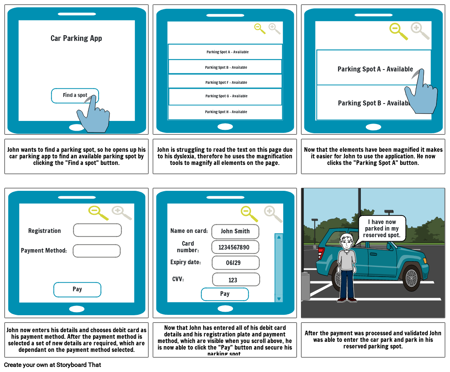
- John wants to find a parking spot, so he opens up his car parking app to find an available parking spot by clicking the "Find a spot" button.
- Payment Method:
- Registration Plate:
- John is struggling to read the text on this page due to his dyslexia, therefore he uses the magnification tools to magnify all elements on the page.
- Name on card:
- Expiry date:
- Card number:
- 06/29
- 1234567890
- John Smith
- Now that the elements have been magnified it makes it easier for John to use the application. He now clicks the "Parking Spot A" button.
- I have now parked in my reserved spot.
- John now enters his details and chooses debit card as his payment method. After the payment method is selected a set of new details are required, which are dependant on the payment method selected.
- Pay
- Now that John has entered all of his debit card details and his registration plate and payment method, which are visible when you scroll above, he is now able to click the "Pay" button and secure his parking spot.
- CVV:
- Pay
- 123
- After the payment was processed and validated John was able to enter the car park and park in his reserved parking spot.
Over 40 millioner storyboards laget
Ingen Nedlastinger, Ingen Kredittkort og Ingen Pålogging Nødvendig for å Prøve!
