

Module 4 Discussion EDUC 6772


Snemalna Knjiga Besedilo
- Entering the Classroom
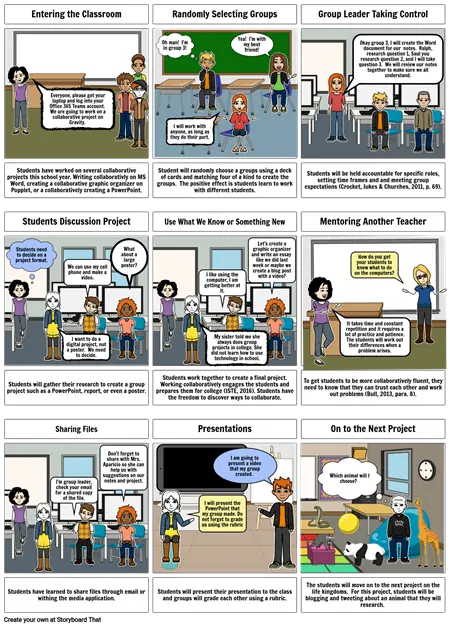
- Everyone, please get your laptop and log into your Office 365 Teams account. We are going to work on a collaborative project on Gravity.
- Randomly Selecting Groups
- Oh man! I'm in group 3!
- I will work with anyone, as long as they do their part.
- Yea! I'm with my best friend!
- Group Leader Taking Control
- Okay group 3, I will create the Word document for our notes. Ralph, research question 1, Saul you research question 2, and I will take question 3. We will review our notes together to make sure we all understand.
- Students have worked on several collaborative projects this school year. Writing collaborativly on MS Word, creating a collaborative graphic organizer on Popplet, or a collaboratively creating a PowerPoint.
- Students Discussion Project
- Students need to decide on a project format.
- We can use my cell phone and make a video.
- What about a large poster?
- Student will randomly choose a groups using a deck of cards and matching four of a kind to create the groups. The positive effect is students learn to work with different students.
- Use What We Know or Something New
- Let's create a graphic organizer and write an essay like we did last week or maybe we create a blog post with a video?
- Students will be held accountable for specific roles, setting time frames and and meeting group expectations (Crocket, Jukes & Churches, 2011, p. 69).
- Mentoring Another Teacher
- How do you get your students to know what to do on the computers?
- Students will gather their research to create a group project such as a PowerPoint, report, or even a poster.
- I want to do a digital project, not a poster. We need to decide.
- Students work together to create a final project. Working collaboratively engages the students and prepares them for college (ISTE, 2016). Students have the freedom to discover ways to collaborate.
- My sister told me she always does group projects in college. She did not learn how to use technology in school.
- I like using the computer, I am getting better at it.
- To get students to be more collaboratively fluent, they need to know that they can trust each other and work out problems (Bull, 2013, para. 8).
- It takes time and constant repetition and it requires a lot of practice and patience. The students will work out their differences when a problem arises.
- Sharing Files
- I'm group leader, check your email for a shared copy of the file.
- Don't forget to share with Mrs. Aparicio so she can help us with suggestions on our notes and project.
- Presentations
- I will present the PowerPoint that my group made. Do not forget to grade us using the rubric
- I am going to present a video that my group created.
- On to the Next Project
- Which animal will I choose?
- Students have learned to share files through email or withing the media application.
- Students will present their presentation to the class and groups will grade each other using a rubric.
- The students will move on to the next project on the life kingdoms. For this project, students will be blogging and tweeting about an animal that they will research.