

Big Picture Storyboard


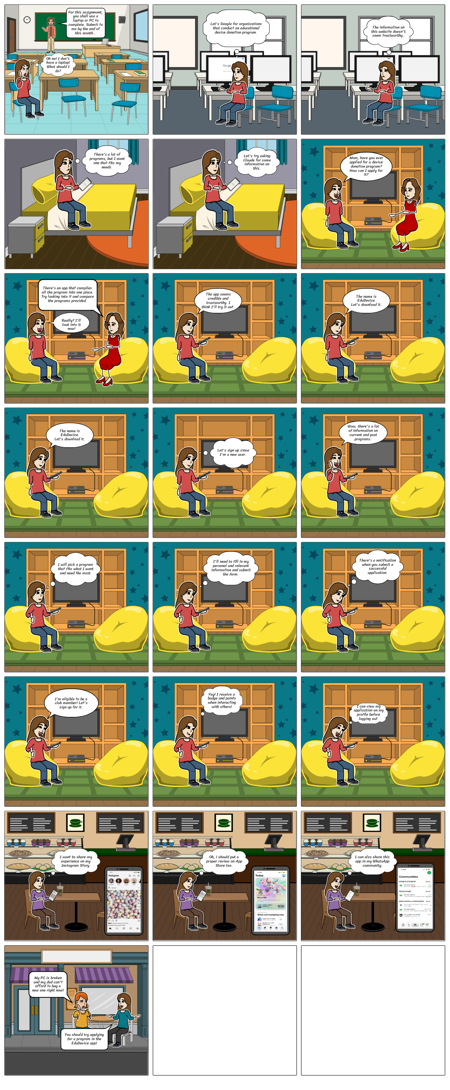
Storyboard Text
- Slide: 1
- For this assignment, you shall use alaptop or PC to complete. Submit to me by the end of this month...
- Oh no! I don't have a laptop! What should I do?
- Slide: 2
- Let's Google for organizations that conduct an educational device donation program.
- Slide: 3
- The information on this website doesn't seem trustworthy..
- Slide: 4
- There's a lot ofprograms, but I want one that fits my needs.
- Slide: 5
- Let's try asking Claude for some information on this.
- Slide: 6
- Mom, have you ever applied for a device donation program? How can I apply for it?
- Slide: 7
- There's an app that compiles all the program into one place.Try looking into it and compare the programs provided.
- Really? I'll look into it now!
- Slide: 8
- The app seems credible and trustworthy. I think I'll try it out.
- Slide: 9
- The name is EduDevice.Let's download it.
- Slide: 10
- The name is EduDevice.Let's download it.
- Slide: 11
- Let's sign up since I'm a new user.
- Slide: 12
- Wow, there's a lot of information on current and past programs.
- Slide: 13
- I will pick a program that fits what I want and need the most.
- Slide: 14
- I'll need to fill in my personal and relevant information and submit the form.
- Slide: 15
- There's a notification when you submit a successful application.
- Slide: 16
- I'm eligible to be a club member! Let's sign up for it.
- Slide: 17
- Yay! I receive a badge and points when interacting with others!
- Slide: 18
- I can view myapplication on my profile beforelogging out.
- Slide: 19
- I want to share my experience on my Instagram Story.
- Slide: 20
- Oh, I should put a proper review on App Store too.
- Slide: 21
- I can also share this app in my WhatsApp community.
- Slide: 22
- My PC is broken and my dad can't afford to buy a new one right now!
- You should try applying for a program in the EduDevice app!